








The authority is taking this step in order to create a centralized database of subscribers and to prevent SIM boxing and other related offenses.
Following that, all subscribers will either need to visit a vendor to have their SIM cards re-registered using the Ghana Card or will be able to complete the process using their mobile phone.
For your knowledge, each subscriber is permitted to register or re-register a total of ten SIM cards using the same Ghana Card.
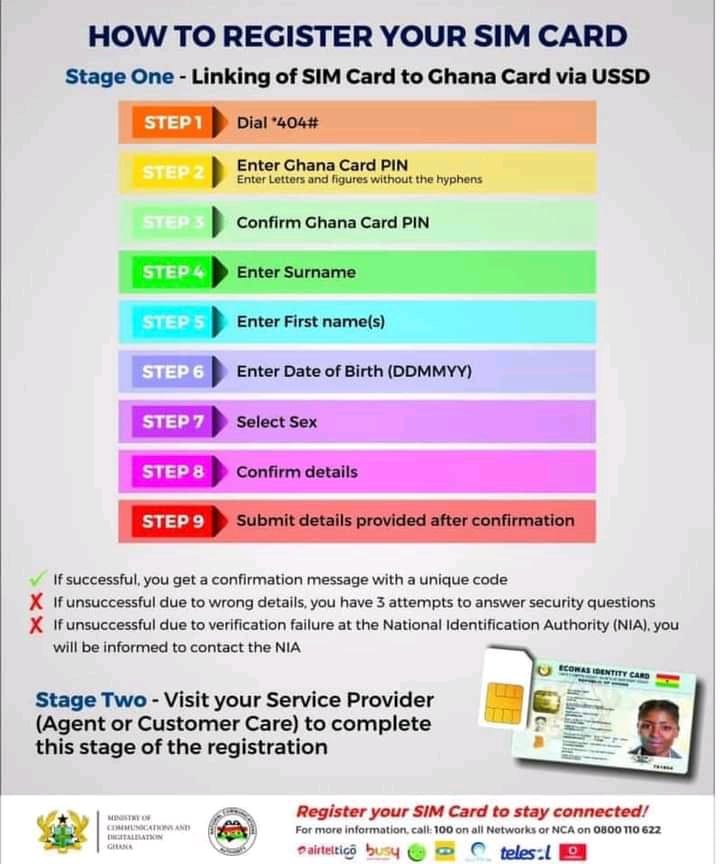
How do I re-register my SIM Card using a Ghana card?
Follow these steps:
- Dial the shortcode *404#
- Enter Ghana Card Pin ( Note: Enter letters and figures without hyphens)
- Confirm Ghana Card Pin
- Enter Surname
- Enter First Name(s)
- Enter Date of Birth (Format: DDMMYYYY)
- Select Sex
- Confirm Details
- Submit Details Provided After Confirmation
Note:
1, If successful, you will get a confirmation message with a unique code
2, If unsuccessful due to wrong details, you have 3 attempts to answer security questions
3, If unsuccessful due to verification failure at the National Identification Authority (NCA), you will be informed to contact the NIA.